Build and Push Docker Image with DevOps Pipeline
Purpose
This guide outlines the setup for automating the build and push of a Docker image to a private registry using DevOps Pipeline. The workflow is triggered on:
- Tag pushes: Whenever a new tag is pushed.
- Manual dispatch: The workflow can be manually triggered.
Prerequisites
Ensure that:
- Your repository is hosted on a supported version control system.
- You have DevOps Pipeline enabled.
- You have registered an Odoo Registry in the service connection.
DevOps Agent
The DevOps agent must run on a Linux machine with Docker installed.
💡 Note: Implement a cleanup script on the machine, as the build process generates a significant amount of cached data. For a detailed walkthrough, see Automated Cleanup of Docker Images.
DevOps Build Pipeline
graph LR
    B[Checkout code]
    B --> C[Get short commit hash]
    C --> D[Build Docker image]
    D --> E[Push Docker image]
This pipeline automates the building and pushing of Odoo Docker images. The resulting Docker image will be named as private_registry/<REPO_NAME>:<TAG>. The tagging mechanism differentiates between two scenarios:
- For non-tag pushes (Manual dispatch), the image is tagged using the short commit hash.
- For tag pushes, the image is tagged with the corresponding tag name
The pipeline is triggered on refs/tags/*, as shown in the example below:
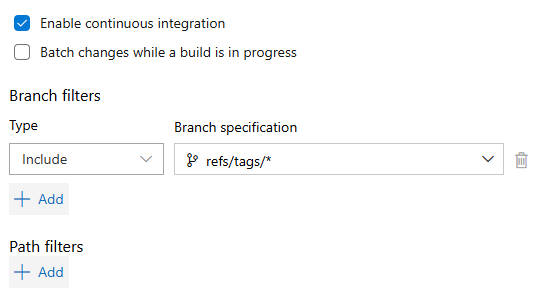
Pipeline configuration:
trigger:
  branches:
    include:
      - refs/tags/*

jobs:
- job: Build_and_Push
  displayName: Build and Push Docker Image
  pool:
    name: DOCKER

  steps:
  - checkout: self

  - task: Bash@3
    displayName: Extract Version (Tag or Commit Hash)
    inputs:
      targetType: inline
      script: |
        if [[ "$(Build.SourceBranch)" == refs/tags/* ]]; then
            dockertag=$(echo $(Build.SourceBranch) | sed -e "s/^refs\/tags\///")
            echo "##vso[task.setvariable variable=dockertag;]$dockertag"
            echo "Version tag detected: $dockertag"
        else
            dockertag=$(echo $(Build.SourceVersion) | cut -c-7)
            echo "##vso[task.setvariable variable=dockertag;]$dockertag"
            echo "No tag detected, using commit hash: $dockertag"
        fi

  - task: Docker@2
    displayName: Build and Push Docker Image
    inputs:
      containerRegistry: 'Registry'
      repository: $(Build.Repository.Name)
      tags: $(dockertag)
For greater control over the build and push process, the build and push commands are separated:
- task: Docker@2
  displayName: Build
  inputs:
    containerRegistry: 'Registry'
    repository: '$(Build.Repository.Name)'
    command: build
    tags: '$(dockertag)'

- task: Docker@2
  displayName: Push
  inputs:
    containerRegistry: 'Registry'
    repository: '$(Build.Repository.Name)'
    command: push
    tags: '$(dockertag)'